Showing posts with label ARTICLE. Show all posts

GIGABYTE : Digital Power Engine (3D Power)


GIGABYTE Z77 series motherboards take advantage of an exclusive All Digital PWM controller array, to deliver power to the board's 3rd generation Intel® Core™ processor. Using entirely digital controllers means that more precise power delivery to the motherboard's most power hungry and energy sensitive components is possible. These components include the CPU, VTT, processor graphics and memory, without doubt the most important components on your motherboard. This All Digital Power system, with Precise Auto Voltage Compensation, provides you with exceptional control over the component power delivery on your GIGABYTE 7 series motherboard. 


GIGABYTE 3D Power: Digital Voltage, Frequency and Phase Control 
Utilizing an exclusive All Digital controller array, GIGABYTE's 3D Power features precise Auto Voltage Compensation to deliver a steady flow of power to the system, no matter the loading. With digital controllers for the CPU (Vcore), VTT, processor graphics and memory (DDR), users can make real-time adjustments with the exclusive GIGABYTE 3D Power Utility, that include settings such as OVP (Over Voltage Protection), Load-line Calibration and on-the-fly PWM frequency adjustment.

GIGABYTE 3D Power Utility

Users can enjoy a fully interactive 3D utility that facilitates adjustment of the 3 dimensions that control the power delivery to your CPU and Memory: Voltage, Phase and Frequency. These parameters are crucial to how the digital PWM supplies power to critical areas of the motherboard and can help users quickly obtain the highest, most stable overclock.


3D Power: Voltage Control
Voltage parameters can be modified within 3D Power, including load line calibration of the CPU. By adjusting load line calibration, Vdroop can be avoided, maintaining optimal voltages levels despite increasing current levels. OVP (over voltage protection) can also be adjusted to change default protection range of the CPU, IGP, VTT and system memory.


3D Power: Phase Control
Users can calibrate OCP (Over Current Protection) for the CPU, integrated memory controller and system memory power levels. This allows the Phase control to deliver even more power to the system when needed.


3D Power: Frequency Control
GIGABYTE's all digital PWM allows for adjustable frequency control via the International Rectifier PWM controller. 3D Power frequency control allows users to change the PWM controller frequency so that the CPU VRM can adjust power delivery speeds more quickly. Users can also adjust the PWM spectrum or maximum and minimum overall frequencies.


Nvidia's New Kepler Architecture


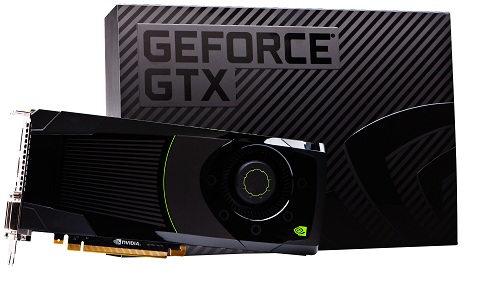
New architectures don't come around quite as frequently for video cards as they do for processors, but they can have almost as big an impact. That's certainly what Nvidia is trying to prove with its new Kepler architecture. Nvidia promises it will deliver impressive gains in terms of power and performance for desktops and laptops alike, and you should expect to start seeing it appear in both stay-at-home and out-and-about computers starting soon. We've already reviewed the first desktop discrete card based on the Kepler architecture, the GeForce GTX 680,  so if you're interested in where Nvidia is planning on taking PC graphics processing, we've already got you covered.Still, there's a ton of information out there about Kepler itself—its genesis, its features, its capabilities—to sift through. So we've prepared this brief rundown of six important things to know about what Kepler is, how it works, and what it will mean for PC graphics in the upcoming year or two.

1. "Kepler" is "Fermi" evolved. 
Nvidia heralded its "Fermi" architecture, released in 2010 on its GTX 480 video card, as a major advance in parallel processing. It was based on a collection of four Graphics Processing Clusters (or GPCs), each of which contained a raster engine and four Streaming Multiprocessor (or SM) units. Each SM, in turn, contained 32 CUDA processing cores, 16 texture units, and a polymorph engine. The GTX 680's GPCs use a similar design, but with a couple of key differences. Each SM is now a "next-generation Streaming Multiprocessor," which Nvidia abbreviates as SMX; each SMX contains 192 CUDA cores, for a total of 1,536 cores in the entire Kepler GPU—which suggests potential for considerably greater performance; and the polymorph engines have been redesigned to deliver twice of the performance of those used in Fermi, for what Nvidia calls "a significant improvement in tessellation workloads." But because all those CUDA cores also run at a lower clock speed than Fermi's did, the GPU as a whole uses less power even as it delivers more performance. (We've verified this in our own testing, by the way.) This could prove to be especially good news for laptop owners, as those power savings can easily translate to longer battery life.

2. Memory has been rethought. 
There are changes to the memory system as well as the processing structure. An L2 cache of 512KB is shared across the GPU to provide extra buffer space for the chip's various units; its cache hit bandwidth and atomic operation have both been increased to provide additional support for all those more powerful CUDA cores. A Kepler GPU also contains four 64-bit memory controllers, operating at an overall data rate of 6,008MHz—a significant improvement over the 3,696MHz of the GTX 480, which was loaded with six 64-bit controllers. Nvidia boasts about achieving the 6,008MHz speed by way of a new I/O system based on improvements in circuit and physical design, link training, and signal integrity. On the GTX 680, which is equipped with 2GB of GDDR5 memory, this all adds up to a total memory bandwidth of 192.26GBps, again more than the 177.4GBps seen on the GTX 480.

3. It's speedier than it looks.
Nvidia has instituted for Kepler-based hardware a new technology called GPU Boost. Similar to Intel's Turbo Boost and AMD's Turbo Core, GPU Boost ensures that the video card's clock speed is, in fact, a very fluid thing. For example, the GTX 680 has a base clock running at 1,006MHz. But if the card is operating below its TDP, meaning it's using less power than it's capable of using (because it's running a not-too-demanding 3D game, for example), it can dynamically increase its clock speed until the gap is filled. It's tough to say at this point how much of a performance improvement you can expect in any given title, though we have an idea of the range. The average upped clock speed is 1,058MHz, but Kepler GPUs are capable of going even higher than that. This is before overclocking is figured in, by the way—that remains an option for gaining even more speed. (GPU Boost is currently only slated to be available in desktop products; laptop users are out of luck, at least for now.)

4. Video has been re envisioned.
Nvidia has implemented a new display engine on its Kepler GPUs that enable some useful features. Whereas previous Nvidia cards were limited to powering two monitors, you can now drive four at a time with a single card like the GTX 680—nice if you want to have three displays for a 3D Vision Surround setup and one for actual work. On Kepler GPUs you'll also now find a hardware-based H.264 video encoder called NVENC. On previous Nvidia cards encoding was handled by the CUDA cores, and their use increased power consumption; a hardware solution consumes much less power and, according to Nvidia, encodes video almost four times faster. Nvidia claims that NVENC can encode 1080p videos eight times faster than real time, and can encode up to resolutions of 4,096 by 4,096. NVENC supports H.264 Base, Main, and High Profile Level 4.1 (the same as the Blu-ray standard), and the H.264 extension Multiview Video Coding (MVC) for stereoscopic video for use with Blu-ray 3D.

5. Anti-aliasing goes pro.
Kepler-based GPUs push anti-aliasing beyond the common styles today (Multisample Anti-Aliasing, or MSAA, is the big one, though Nvidia also uses Coverage Sample Anti-Aliasing and AMD Morphological Anti-Aliasing) with a new flavor called Temporal Anti-Aliasing (or TXAA for short). According to Nvidia, TXAA is a new "film-style" technique that blends MSAA with Fast Approximate Anti-Aliasing (FXAA), where it analyzes all the pixels on the screen and smooths the ones it detects create an artificial edge. Because no game yet supports TXAA, we weren't able to test this, but Nvidia says it delivers the kind of image quality you'd get from 8x MSAA with the accompanying performance hit of only 2x MSAA.

6. Less focus on compute.
All of Nvidia's changes have resulted in what is, overall, the fastest and the most electricity-bill-friendly single-GPU gaming video card we've yet seen. But this title hasn't come without one sacrifice: compute. Fermi GPUs were sold, at least partially, on their ability to perform mathematical calculations à la CPUs, and displayed impressive facility doing just that, but Nvidia stripped some of those abilities away in order to improve power efficiency. Using LuxMark 2.0, an application designed for testing OpenCL compute performance, we compared last generation's GeForce GTX 580 (based on an updated Fermi-style GPU) with the GTX 680, and the earlier card came out ahead in every test—and AMD's new cards, like the Radeon HD 7970, did even better. If you want a card that's every bit as good for work as play, Kepler-based GPUs may not be the way to go. But the GTX 680 is the runaway champs for playing 3D games on your PC.

Upcoming 7-Series Motherboards

With Intel's next generation processors firmly on the horizon, we should also turn to what motherboards will be on offer when we have the opportunity to root around in our pockets to invest in an next generation system.  With appropriate vendor support, 6-series motherboards will support these new processors with little more than a BIOS update, however to get the most out of the new processor, we have to look at the new range of motherboards about to hit the market.  This brief look at some of them is by no means an exhaustive list, however we would like to know what you find most interesting and would like to be reviewed over the next few months.


7-Series Chipsets
As with all of Intel’s major chipset releases, we have the opportunity to pick from a wide range of models to suit different needs, price points, or even business models.  With Sandy Bridge, we also had distinct segregation – H67 had IGP but no overclocking, P67 did not have IGP but overclocked, and Z68 had both.  Thankfully this time all the new chipsets have IGP outputs to take advantage of the IGP, and the main differences lie in PCIe configuration limitations and use of Intel’s Smart Response Technology:

Chipset Comparison
 Z77Z75H77Z68P67H67
CPU SupportIVB
LGA-1155
IVB
LGA-1155
IVB
LGA-1155
SNB/IVB
LGA-1155
SNB/IVB
LGA-1155
SNB/IVB
LGA-1155
CPU OverclockingYesYesNoYesYesNo
CPU PCIe Config1 x16 or
2 x8 or
1 x8 + 2 x4
PCIe 3.0
1 x16 or
2 x8 PCIe 3.0
1 x16 PCIe 3.01 x16 or
2 x8 or
1 x8 + 2 x4
PCIe 3.0
1 x16 or
2 x8 PCIe 3.0
1 x16 PCIe 3.0
Processor Graphics SupportYesYesYesYesNoYes
Intel SRT (SSD caching)YesNoYesYesNoNo
RAID SupportYesYesYesYesYesYes
USB 2.0 Ports (3.0)14 (4)14 (4)14 (4)141414
SATA Total (Max Number of 6Gbps Ports)6 (2)6 (2)6 (2)6 (2)6 (2)6 (2)


The beauty of Ivy Bridge predominantly comes in the form of PCIe 3.0, which should alleviate many of the PCIe bus bandwidth bottlenecks in multi-GPU setups, and native USB 3.0 on board.  Some vendors may expand these features – PCIe lanes may be increased through a PCIe 3.0 PLX chip (similar to NF200 on X58), or third-party USB 3.0 controllers will be added to the boards.  In this brief look over some of the 7-series motherboards, we will see both in action.  However that PLX chip looks fairly expensive.

AMD Eyefinity Technology

Multi-display technology for gaming, productivity, and entertainment

Supporting multiple independent display outputs simultaneously, AMD Eyefinity technology delivers innovative graphics display capabilities enabling massive desktop workspaces and ultra-immersive visual environments for the ultimate panoramic computing experience.

What is AMD Eyefinity technology?
AMD Eyefinity technology is a solution developed by AMD that allows consumers to run up to six simultaneous displays off of a single graphics card. This is a unique feature of AMD graphics products that cannot be found on any other consumer graphics solution at this time.
More importantly for consumers, AMD Eyefinity technology is not a feature we reserve for our most expensive products. Indeed, AMD Eyefinity technology is available on more than 45 consumer and professional-grade products. These products cover a very large spectrum of prices, giving you the flexibility to find the solution that you need.


How does AMD Eyefinity technology work?
AMD Eyefinity technology leverages both hardware and software. In terms of hardware, the AMD Radeon Premium and AMD Mobility Radeon™ GPUs listed above allow up to 6 displays to be driven from a single GPU. Unlike previous products which have a maximum of two display pipelines, AMD Eyefinity technology supports up to 6 display pipelines per GPU.
In terms of software, there are several different configuration options. Traditional extended and cloned display modes are all still available, but with AMD Eyefinity technology, if the displays can support the same resolutions then they can also be stitched together into a "single large surface" or "Display Group" (as described by the AMD Catalyst Control Center™ software). When a Display Group is created, it appears to the operating system and application as a single monitor with a very large resolution.

What Operating Systems does AMD Eyefinity technology work with?

At present Windows® Vista and Windows® 7 support AMD Eyefinity technology. There are plans for Linux support in an upcoming update to AMD Catalyst™ software. There is no support for Windows® XP.


NVIDIA PureVideo Technology


NVIDIA® PureVideo® technology brings movies to life. PureVideo uses advanced techniques found only on very high-end consumer players and TVs to make Blu-ray, HD DVD, standard-definition DVD movies, PC and mobile device content look crisp, clear, smooth and vibrant. Regardless of whether you’re watching on an LCD monitor or a plasma TV, with PureVideo the picture will always be precise, vivid and lifelike.

PureVideo is included on the processing cores on NVIDIA GPUs and handheld devices for the decoding and playback of video. If your PC is equipped with one of these GPUs, you can take advantage of PureVideo and PureVideo HD. NVIDIA applications processors also leverage this technology to deliver top class video quality to mobile devices.

Essential for the Ultimate HD Movie Experience
Blu-ray and HD DVD movies are bringing a new level of movie-viewing experience, with high-definition image quality far surpassing standard-definition DVDs. To deliver the ultimate HD movie experience when playing Blu-ray and HD-DVD, NVIDIA developed PureVideo™ HD technology, available with NVIDIA® GeForce® Series 7 and 8 GPUs.
PureVideo HD technology features hardware acceleration, integration with leading movie players, and is designed to meet the HDCP specification for output protection management and security specifications of Blu-ray and HD DVD movie formats. NVIDIA PureVideo HD technology delivers superb picture quality for all video formats, as well as stunning HD DVD and Blu-ray movies—with low CPU utilization and power consumption.
It is the essential ingredient for the ultimate high definition movie and video experience on a PC.

Revolutionary New Video Processing Architecture
NVIDIA GeForce 8400, 8500, and 8600 GPUs for Desktop and GeForce 8400M and 8600M for Notebooks, incorporate a revolutionary new video processing architecture, making them the world’s first GPU video processors to offload 100% of Blu-ray and HD DVD H.264 video decoding from the CPU.** This added processing power gives PureVideo HD technology the ability to support more complex features as they are added to Blu-ray and HD DVD movies, including “picture-in-picture” movies, interactive games and menus, and higher bit-rate / higher quality movie pictures.
**Currently supported in Windows Vista only


Low CPU Utilization and Power Consumption
PureVideo HD technology offloads the CPU and 3D engine of the complex video decoding tasks, allowing the user to run other applications while playing a high definition movie. Lower CPU utilization can result in reduced power consumption, heat and noise, and longer battery life.


Superb Picture Quality
NVIDIA PureVideo HD technology delivers outstanding picture clarity, ultra-smooth video, vivid color, and precise image scaling for video and HD DVD and Blu-ray movies. PureVideo HD accelerates and enhances high-definition movies in H.264, VC-1, WMV, and MPEG-2 formats, delivering life-like images that have up to six times the detail of standard DVD movies. High definition post-processing features, including advanced de-interlacing, noise reduction, and edge enhancement, provide spectacular picture clarity at resolutions up to 1080p—the highest HD resolution available.


The Core of a Complete Blu-ray/HD DVD Solution
Featuring hardware acceleration, post-processing, HDCP circuitry, and integration with leading HD movie software players, PureVideo HD technology is a core ingredient for delivering a visually stunning movie viewing experience on a PC. NVIDIA is working closely with software developers, graphics cards manufacturers, and optical disk drive manufacturers, to help PC manufacturers build the ultimate PC for high-definition movie playback. Leading OEMs including Dell, HP, Toshiba and Acer have adopted NVIDIA GeForce GPUs with PureVideo HD technology to power their Blu-ray and HD DVD PCs.